AI motion graphics tutorials
Guides for making maps, charts, diagrams, and chat scenes with AI. Every tutorial includes the prompts, so you can copy them and start from a result instead of a blank box.
How to Create a SaaS Animation with AI
I used to spend 1-3 days in Adobe After Effects on one product film. Each line, the phone, and the end card needed its own keyframes. You can now generate that same SaaS animation with AI motion graphics tools. How to Create a SaaS Animation with Easymotion With Easymotion, you can skip the timeline entirely. You do not have to keyframe every line of the product film by hand. Here is exactly how to generate your SaaS animation. Step 1: Open the Studio First, navigate to Easymotion in your web browser and click the "Start Creating" button. You will be prompted to log in or sign up for a free account. Once logged in, you will enter the main studio interface. Step 2: Enter Your Prompt You have two options to create your SaaS product animation. You can browse the template library to find a pre-made SaaS style, or you can describe what you want in the prompt box. A Novaflow promo that opens on Emails and ends on Your AI teammate for real work, a Start free button, and novaflow.ai. Tip: Paste your SaaS website URL in the prompt as a full https:// link, so Easymotion can read the page. Save your brand fonts, colors, and logo in a Brand Kit, and pick the kit before you send. Step 3: Customize Using AI Chat Once your base animation generates, you can adjust the details using the AI chat panel located on the left side of the screen. Just type commands directly into the chat. A light job search app titled The job search. Simplified., with four role cards and an Auto-Apply to All (4) button. Step 4: Export Your Animation When you are happy with the result, click the Export button in the top right corner and select the MP4 format for a standard video file. To overlay this SaaS animation onto another video, make the background transparent first: ask the chat for a transparent background, or press the checkerboard button on the background color in Quick Edit. When the preview shows a checkerboard, export in the MOV format and drop the file into Premiere Pro or DaVinci Resolve. Export your SaaS animation in transparent MOV or standard MP4 format. Adobe After Effects vs AI Motion Graphics A SaaS demo used to mean keyframing every screen of the product by hand. Here is how that work compares to Easymotion in 2026. Aspect Adobe After Effects Easymotion Time to Create 1-3 days 5-10 minutes Skill Required Screen builds and cursor keyframes No design skills needed Cost A Creative Cloud subscription Plans start at $10/month (free plan for template editing) Learning Curve Weeks of practice Instant text prompts Export Options A new render for every product One-click MP4 or transparent MOV Frequently Asked Questions How long does it take to create a SaaS animation? 5-10 minutes. You type the product name and the on-screen lines into the prompt box, and Easymotion builds the screens, the phone, and the end card. Do I need After Effects to make a SaaS animation? No, you do not need Adobe After Effects or any design skills. You describe the product in a prompt, then change the name and the screens in the AI chat on the left. Can I turn Novaflow into a job search app? Yes. Name the new product and the lines you want on screen. The example changes Novaflow into Platform, with The job search. Simplified., four role cards, and Auto-Apply to All (4). What format should I use to overlay the SaaS animation on my video? Use a MOV file with a transparent background. Ask the chat for a transparent background, or set the background color to transparent in Quick Edit, until the preview shows a checkerboard. Then export MOV and place it over your footage in Premiere Pro or DaVinci Resolve. Use MP4 for a normal video file. Does a SaaS animation include music? No. The export is video only, with no sound. Add music in Premiere Pro or DaVinci Resolve after you export.
How to Create a TikTok Follow Animation with AI
I used to spend most of an afternoon in Adobe After Effects on one TikTok follow button. The pill, the cursor, and the change from Follow to Following each needed their own keyframes. You can now generate that same follow animation with AI motion graphics tools. How to Create a TikTok Follow Animation with Easymotion With Easymotion, you can skip the timeline entirely. You do not have to keyframe the pill, the cursor, or the click. Here is exactly how to generate your TikTok follow animation. Step 1: Open the Studio First, navigate to Easymotion in your web browser and click the "Start Creating" button. You will be prompted to log in or sign up for a free account. Once logged in, you will enter the main studio interface. Step 2: Enter Your Prompt You have two options to create your TikTok follow button animation. You can browse the template library to find a pre-made TikTok follow style, or you can describe what you want in the prompt box. A white pill for TikTok, @johndeo, where a cursor clicks the red Follow button and it turns into Following. Tip: To show your own profile photo, click the paperclip, choose Add Images, and attach the photo. Easymotion puts it in the avatar circle. Step 3: Customize Using AI Chat Once your base animation generates, you can adjust the details using the AI chat panel located on the left side of the screen. Just type commands directly into the chat. A Jane Smith profile card with 8856 followers, the bio Content Creator. Lifestyle & Travel., and three videos at 1.2M, 847K, and 2.1M views. Step 4: Export Your Animation When you are happy with the result, click the Export button in the top right corner and select the MP4 format for a standard video file. To overlay this TikTok follow button onto another video, make the background transparent first: ask the chat for a transparent background, or press the checkerboard button on the background color in Quick Edit. When the preview shows a checkerboard, export in the MOV format and drop the file into Premiere Pro or DaVinci Resolve. Export your TikTok follow animation in transparent MOV or standard MP4 format. Adobe After Effects vs AI Motion Graphics A TikTok follow button used to mean building the pill, the cursor, and the click by hand. Here is how that work compares to Easymotion in 2026. Aspect Adobe After Effects Easymotion Time to Create Most of an afternoon Under 60 seconds Skill Required Shape layers and a cursor click No design skills needed Cost A Creative Cloud subscription Plans start at $10/month (free plan for template editing) Learning Curve Weeks of practice Instant text prompts Export Options A new render for every account One-click MP4 or transparent MOV Frequently Asked Questions How long does it take to create a TikTok follow animation? Under 60 seconds. You type the name, the handle, and the button into the prompt box, and Easymotion builds the pill, the cursor click, and the change to Following. Do I need After Effects to make a TikTok follow animation? No, you do not need Adobe After Effects or any design skills. You describe the pill in a prompt, then change the name or the profile in the AI chat on the left. Can I turn the follow button into a full profile card? Yes. Name the person and the numbers you want on screen. The example replaces the pill with a Jane Smith card, 8856 followers, and three videos. What format should I use to overlay the follow button on my video? Use a MOV file with a transparent background. Ask the chat for a transparent background, or set the background color to transparent in Quick Edit, until the preview shows a checkerboard. Then export MOV and place it over your footage in Premiere Pro or DaVinci Resolve. Use MP4 for a normal video file. Is this the real TikTok app? No. It is an animated copy of the TikTok style for videos, such as a reminder to follow your own account. Do not use it to fake follower numbers or to suggest that TikTok supports your product.

How to Create a Logo Reveal Animation with AI
I used to spend most of an afternoon in Adobe After Effects on one logo reveal. The mark had to scale in, and the tagline had to land on the right frame. You can now generate that same logo reveal with AI motion graphics tools. How to Create a Logo Reveal Animation with Easymotion With Easymotion, you can skip the timeline entirely. You do not have to keyframe the mark and the tagline by hand. Here is exactly how to generate your logo reveal. Step 1: Open the Studio First, navigate to Easymotion in your web browser and click the "Start Creating" button. You will be prompted to log in or sign up for a free account. Once logged in, you will enter the main studio interface. Step 2: Enter Your Prompt You have two options to create your logo reveal animation. You can browse the template library to find a pre-made logo reveal style, or you can describe what you want in the prompt box. For example, type: "Create a logo reveal on a dark background. A blue whale mark with boxes on its back fades in, then the word docker, then the line BUILD · SHARE · RUN ANYWHERE." A blue whale mark, the word docker, and the line BUILD · SHARE · RUN ANYWHERE. Tip: To use your own mark, click Logo to Animation and attach an SVG logo. Easymotion builds the reveal around that file. Step 3: Customize Using AI Chat Once your base animation generates, you can adjust the details using the AI chat panel located on the left side of the screen. Just type commands directly into the chat. For example, type: "Replace the whale and the word docker. Show a red play button, then the word YouTube in white beside it." The system updates your video automatically. A red play button, then the word YouTube in white beside it. Step 4: Export Your Animation When you are happy with the result, click the Export button in the top right corner and select the MP4 format for a standard video file. To overlay this logo reveal onto another video, make the background transparent first: ask the chat for a transparent background, or press the checkerboard button on the background color in Quick Edit. When the preview shows a checkerboard, export in the MOV format and drop the file into Premiere Pro or DaVinci Resolve. Export your logo reveal animation in transparent MOV or standard MP4 format. Adobe After Effects vs AI Motion Graphics A logo reveal used to mean keyframing a mark and a tagline by hand. Here is how that work compares to Easymotion in 2026. Aspect Adobe After Effects Easymotion Time to Create Most of an afternoon Under 60 seconds Skill Required Shape layers and text animators No design skills needed Cost A Creative Cloud subscription Plans start at $10/month (free plan for template editing) Learning Curve Weeks of practice Instant text prompts Export Options A new render for every mark One-click MP4 or transparent MOV Frequently Asked Questions How long does it take to create a logo reveal animation? Under 60 seconds. You name the mark and the tagline in the prompt box, and Easymotion fades the whale in and sets the line under the word docker. Do I need After Effects to make a logo reveal animation? No, you do not need Adobe After Effects or any design skills. You describe the mark in a prompt, or attach an SVG with Logo to Animation, then change the wordmark in the AI chat on the left. Can the logo be a wordmark instead of a symbol? Yes. Ask the chat to replace the mark and type the new name. The example swaps the Docker whale for a red play button and the word YouTube. What format should I use to overlay the logo reveal on my video? Use a MOV file with a transparent background. Ask the chat for a transparent background, or set the background color to transparent in Quick Edit, until the preview shows a checkerboard. Then export MOV and place it over your footage in Premiere Pro or DaVinci Resolve. Use MP4 for a normal video file. Can I animate a logo I do not own? No. Use a mark you have the rights to show. The clips here use the Docker and YouTube logos as examples.
How to Create a History Map Animation with AI
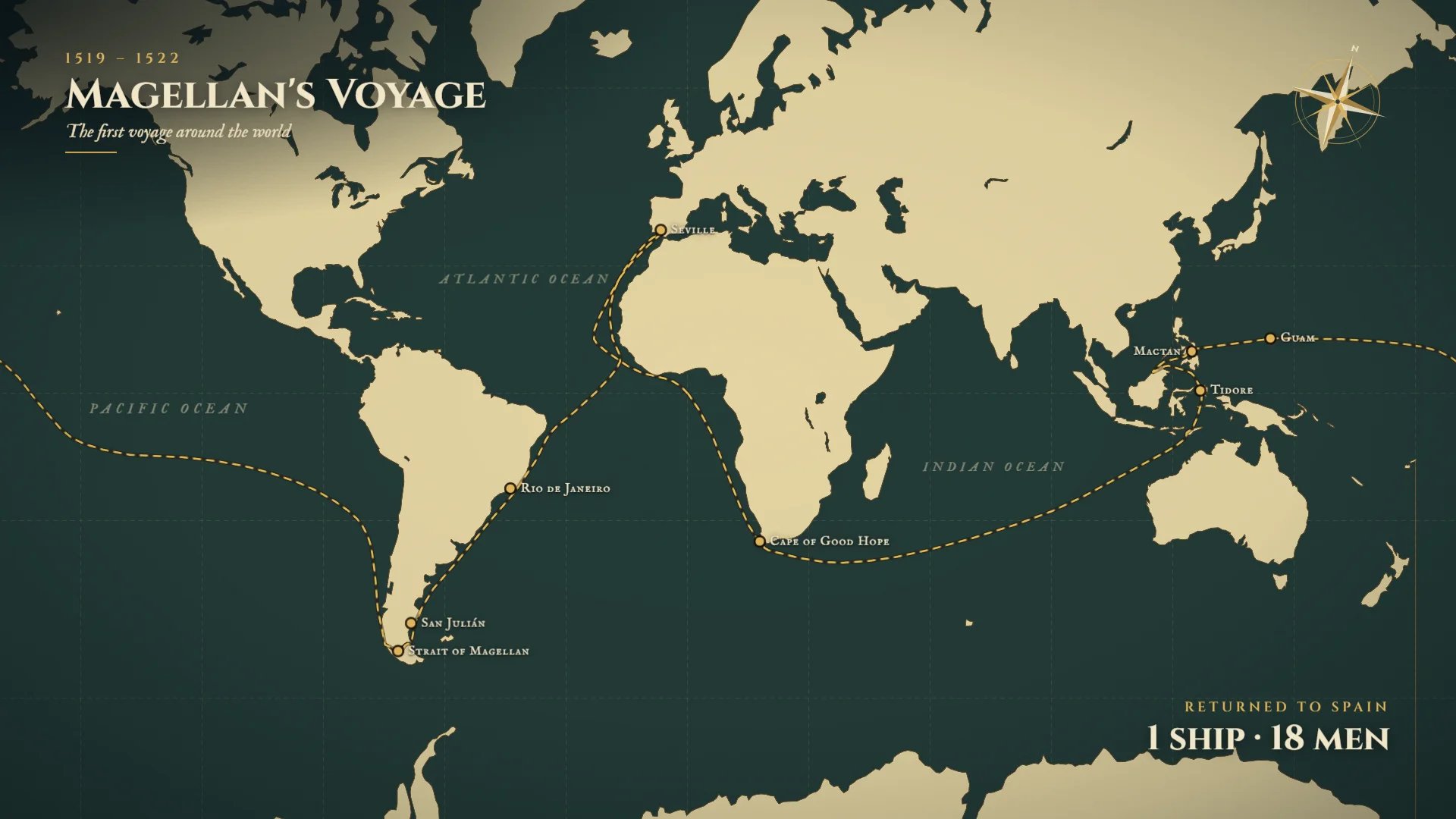
I used to draw a dashed line across a world map in Adobe After Effects and time each date card so the ship arrived on the right day. Magellan's route took me hours. You can now generate that voyage with AI motion graphics tools. How to Create a History Map Animation with Easymotion With Easymotion, you can skip the timeline entirely. You do not have to draw the route or write the date cards. Here is exactly how to generate your history map. Step 1: Open the Studio First, navigate to Easymotion in your web browser and click the "Start Creating" button. You will be prompted to log in or sign up for a free account. Once logged in, you will enter the main studio interface. Step 2: Enter Your Prompt You have two options to create your historical map. You can browse the template library to find a pre-made history map style, or you can describe what you want in the prompt box. For example, type: "Create a dark green and cream map titled Magellan's Voyage, 1519 to 1522, the first voyage around the world. Start in September 1519 with five ships and about 270 men leaving Spain. Draw a dashed gold route through Rio de Janeiro, San Julian, and the Strait of Magellan. Mark that Magellan is killed at Mactan in April 1521, and end on Returned to Spain, 1 ship, 18 men." Magellan's voyage on a dark green and cream map, from Spain in September 1519 through the Strait of Magellan, ending on 1 ship and 18 men. Step 3: Customize Using AI Chat Once your base animation generates, you can adjust the details using the AI chat panel located on the left side of the screen. Just type commands directly into the chat. For example, type: "Make it a vertical parchment map titled The Silk Road, 130 BC to AD 1453. Draw a gold route from Chang'an through Dunhuang, Kashgar, Samarkand, Merv, and Baghdad to Constantinople, and mark Khotan and Taxila. Caption Chang'an with Silk leaves the Han capital, and end on About 6,400 km: Silk, Spices, Paper, Glass, Ideas." The system updates your video automatically. A vertical Silk Road from Chang'an to Constantinople, ending on about 6,400 km. Tip: You do not need every date in the prompt. Name the journey, and Easymotion can search the web for the stops and dates. Check them before you publish. Step 4: Export Your Animation When you are happy with the result, click the Export button in the top right corner and select the MP4 format for a standard video file. To overlay this historical map onto another video, make the background transparent first: ask the chat for a transparent background, or press the checkerboard button on the background color in Quick Edit. When the preview shows a checkerboard, export in the MOV format and drop the file into Premiere Pro or DaVinci Resolve. Export your history map animation in transparent MOV or standard MP4 format. Adobe After Effects vs AI Motion Graphics A historical route used to be a dashed path and a stack of date cards. Here is how that job compares to Easymotion in 2026. Aspect Adobe After Effects Easymotion Time to Create A few hours for one voyage Under 60 seconds Skill Required A hand-drawn route and timed date cards No design skills needed Cost A Creative Cloud subscription Plans start at $10/month (free plan for template editing) Learning Curve Weeks of practice to keep the dates and the route in sync Instant text prompts Export Options A manual render for each map One-click MP4 or transparent MOV Frequently Asked Questions How long does it take to create a history map animation? Under 60 seconds. You name the voyage and the stops in the prompt box, and the map draws the route and the date cards. Do I need After Effects to animate a historical route? No, you do not need Adobe After Effects or any design skills. You describe the journey in a prompt, then change the route in the AI chat on the left. Can I show a trade route instead of a sea voyage? Yes. You can ask for an overland route. The Silk Road clip draws a gold line from Chang'an to Constantinople and ends on the distance. What format should I use to overlay the map on my video? Use a MOV file with a transparent background. Ask the chat for a transparent background, or set the background color to transparent in Quick Edit, until the preview shows a checkerboard. Then export MOV and place it over your footage in Premiere Pro or DaVinci Resolve. Use MP4 for a normal video file. Are the dates and the coastlines exact? The route, the dates, and the closing line of 1 ship and 18 men are the template's ending card. The coastlines are simplified. Check the facts before you publish the map as a history lesson.
How to Create a War Map Animation with AI
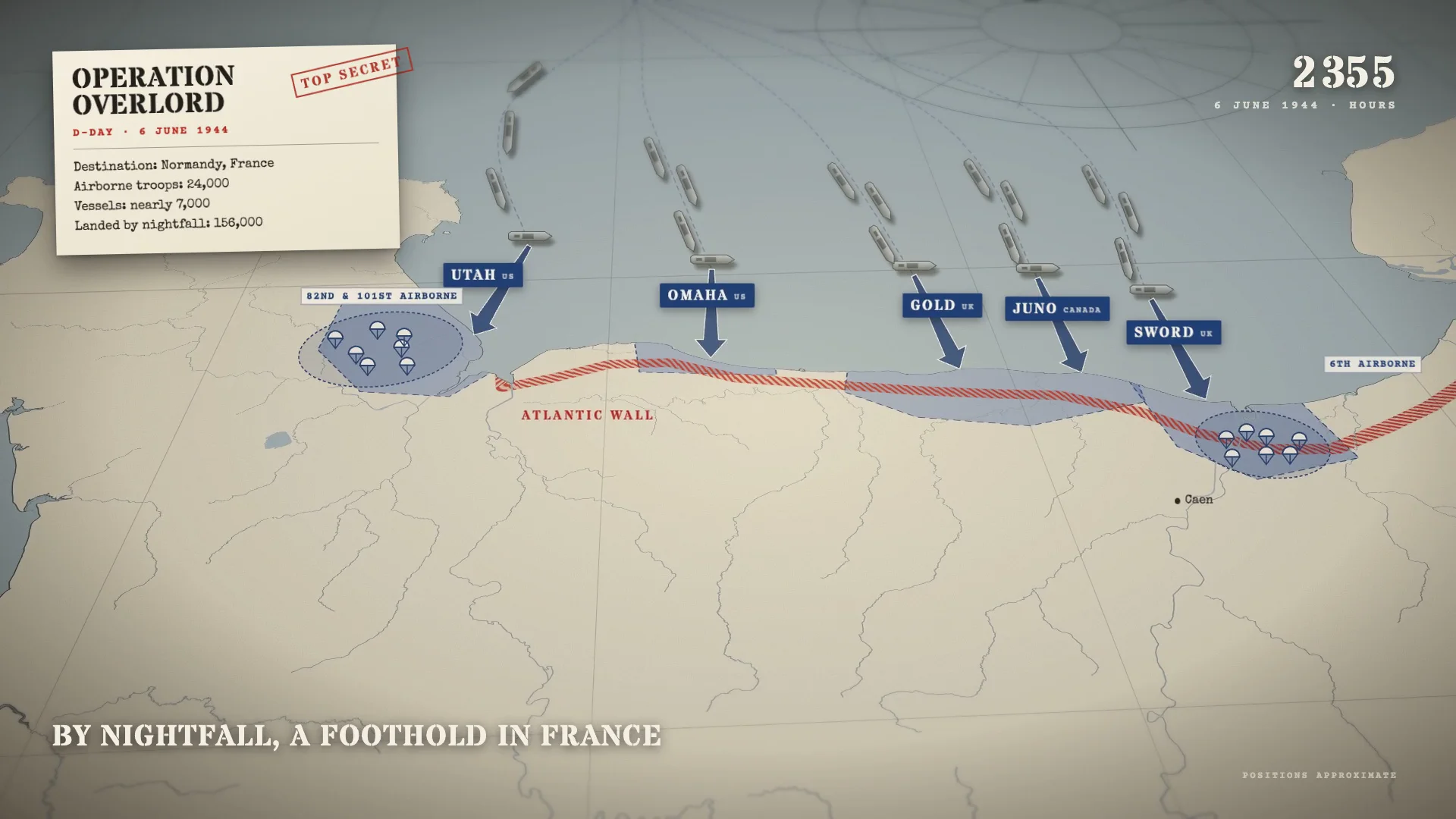
I used to place every ship and beach label by hand on a still of the English Channel in Adobe After Effects, then keyframe the order they appeared through the day. A D-Day map took me a full afternoon. You can now generate that sequence with AI motion graphics tools. How to Create a War Map Animation with Easymotion With Easymotion, you can skip the timeline entirely. You do not have to position each ship or type each beach name. Here is exactly how to generate your war map. Step 1: Open the Studio First, navigate to Easymotion in your web browser and click the "Start Creating" button. You will be prompted to log in or sign up for a free account. Once logged in, you will enter the main studio interface. Step 2: Enter Your Prompt You have two options to create your battle map. You can browse the template library to find a pre-made war map style, or you can describe what you want in the prompt box. For example, type: "Create a parchment map of the English Channel titled Operation Overlord, D-Day, 6 June 1944, with a Top Secret stamp. Show ships crossing from England, airborne drops on both flanks, the Atlantic Wall in red, and the beaches Utah, Omaha, Gold, Juno, and Sword. End on the line By nightfall, a foothold in France." A parchment Operation Overlord map with ships, airborne drops, the Atlantic Wall in red, and the beaches Utah, Omaha, Gold, Juno, and Sword. Step 3: Customize Using AI Chat Once your base animation generates, you can adjust the details using the AI chat panel located on the left side of the screen. Just type commands directly into the chat. For example, type: "Make it vertical. Title it Pearl Harbor, Sunday, December 7, 1941. Open on the Japanese carrier fleet, 6 carriers, 230 miles north of Oahu, at 05:58 Hawaii time. Show the first wave of 183 aircraft over Oahu, then hits on Wheeler Field, Pearl Harbor, Hickam Field, and Kaneohe Bay. Zoom to Battleship Row at Ford Island, and end on 2,403 Americans killed and 188 aircraft destroyed." The system updates your video automatically. A vertical Pearl Harbor map from the Japanese carrier fleet to Battleship Row, ending on 2,403 Americans killed and 188 aircraft destroyed. Tip: Making a series? Save your channel colors, fonts, and logo in a Brand Kit, and pick it before each prompt so every map matches. Step 4: Export Your Animation When you are happy with the result, click the Export button in the top right corner and select the MP4 format for a standard video file. To overlay this battle map onto another video, make the background transparent first: ask the chat for a transparent background, or press the checkerboard button on the background color in Quick Edit. When the preview shows a checkerboard, export in the MOV format and drop the file into Premiere Pro or DaVinci Resolve. Export your war map animation in transparent MOV or standard MP4 format. Adobe After Effects vs AI Motion Graphics Building a battle map used to mean a still image and a long list of keyframes. Here is how that job compares to Easymotion in 2026. Aspect Adobe After Effects Easymotion Time to Create A full afternoon for one battle map Under 60 seconds Skill Required Hand-placed ships, labels, and a clock No design skills needed Cost A Creative Cloud subscription Plans start at $10/month (free plan for template editing) Learning Curve Weeks of practice to stage a battle in order Instant text prompts Export Options A manual render for each map One-click MP4 or transparent MOV Frequently Asked Questions How long does it take to create a war map animation? Under 60 seconds. You describe the battle in the prompt box, and the map places the labels, the movements, and the closing line. Do I need After Effects to make a battle map? No, you do not need Adobe After Effects or any design skills. You describe the battle in a prompt, then change the campaign in the AI chat on the left. Can I make the war map vertical for Shorts? Yes. Ask for a vertical frame in the chat. The Pearl Harbor clip is a 9:16 map, with the title, the clock, and the closing figures stacked for a phone. What format should I use to overlay the map on my video? Use a MOV file with a transparent background. Ask the chat for a transparent background, or set the background color to transparent in Quick Edit, until the preview shows a checkerboard. Then export MOV and place it over your footage in Premiere Pro or DaVinci Resolve. Use MP4 for a normal video file. Should I trust the numbers on the map? The dates, troop counts, and casualty figures come from the template. Check them against a source you trust before you use the map in a documentary or a news video.
How to Create a Timeline Animation with AI
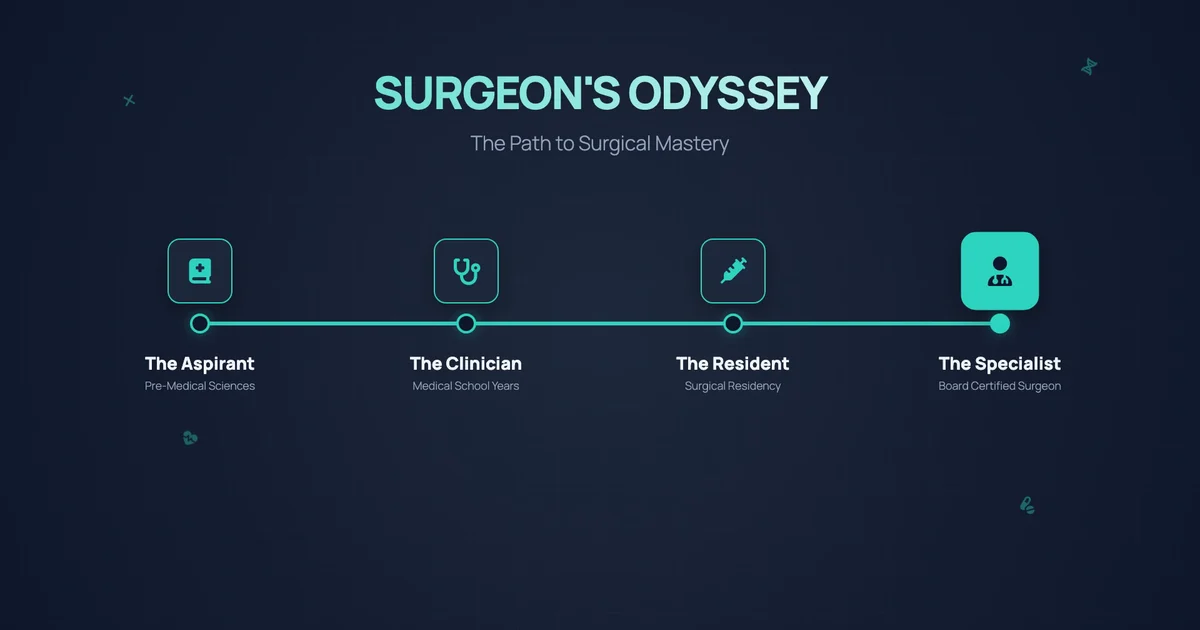
I used to spend a whole afternoon in Adobe After Effects on one animated timeline for a presentation. Every milestone needed its own icon, label, and timing along the line, and one more stop meant spacing them all again. You can now generate that same timeline with AI motion graphics tools. How to Create a Timeline Animation with Easymotion With Easymotion, you can skip the keyframes entirely. You do not have to place and time each milestone by hand. Here is exactly how to generate your timeline. Step 1: Open the Studio First, navigate to Easymotion in your web browser and click the "Start Creating" button. You will be prompted to log in or sign up for a free account. Once logged in, you will enter the main studio interface. Step 2: Enter Your Prompt You have two options to create your animated timeline. You can browse the template library to find a pre-made timeline style, or you can describe what you want in the prompt box. For example, type: "Create a timeline animation on a dark navy background titled Surgeon's Odyssey, with the subtitle The Path to Surgical Mastery. Draw a teal line that reaches four milestones, each with an icon: The Aspirant (Pre-Medical Sciences), The Clinician (Medical School Years), The Resident (Surgical Residency), and The Specialist (Board Certified Surgeon)." A teal career timeline titled Surgeon's Odyssey that reaches four milestones, from The Aspirant to The Specialist. Tip: Keep your dates and milestones in a spreadsheet? Click the paperclip, choose Add Data (CSV/XLSX), and attach the sheet. Easymotion reads the rows and builds the timeline from them. Step 3: Customize Using AI Chat Once your base animation generates, you can adjust the details using the AI chat panel located on the left side of the screen. Just type commands directly into the chat. For example, type: "Make it a company history titled Shaping Our Future. Show one milestone at a time, each with a photo, a colored date tag, a heading, and one line of text: January 2019 Our Foundation, March 2021 Growth Phase, August 2023 Global Reach, and December 2025 Future Vision." The system updates your video automatically. A company history titled Shaping Our Future that shows one photo and date at a time, from January 2019 to December 2025. Step 4: Export Your Animation When you are happy with the result, click the Export button in the top right corner and select the MP4 format for a standard video file. To overlay this timeline onto another video, make the background transparent first: ask the chat for a transparent background, or press the checkerboard button on the background color in Quick Edit. When the preview shows a checkerboard, export in the MOV format and drop the file into Premiere Pro or DaVinci Resolve. Export your timeline animation in transparent MOV or standard MP4 format. Adobe After Effects vs AI Motion Graphics An animated timeline used to mean placing and timing every milestone by hand. Here is how that work compares to Easymotion in 2026. Aspect Adobe After Effects Easymotion Time to Create 2 to 4 hours Under 60 seconds Skill Required Shape layers, text layers, and careful timing No design skills needed Cost A Creative Cloud subscription Plans start at $10/month (free plan for template editing) Learning Curve Weeks to months Instant text prompts Export Options A full render after every new date One-click MP4 or transparent MOV Frequently Asked Questions How long does it take to create a timeline animation? Under 60 seconds. You type the title and the milestones into the prompt box, and Easymotion draws the line and reveals each stop in order. Do I need After Effects to make an animated timeline? No, you do not need Adobe After Effects or any design skills. You describe the timeline in a prompt, then add or change milestones in the AI chat on the left. Can I add photos to each milestone? Yes. Easymotion can pick stock photos for each stop, as in the second clip, or you can attach your own pictures with Add Images. What format should I use to overlay the timeline on my video? Use a MOV file with a transparent background. Ask the chat for a transparent background, or set the background color to transparent in Quick Edit, until the preview shows a checkerboard. Then export MOV and place it over your footage in Premiere Pro or DaVinci Resolve. Use MP4 for a normal video file. Can I make a timeline of historical events? Yes. Type the events and their years in the prompt, in order. Check every date before you publish, because the timeline shows what you give it.
How to Create a Search Bar Animation with AI
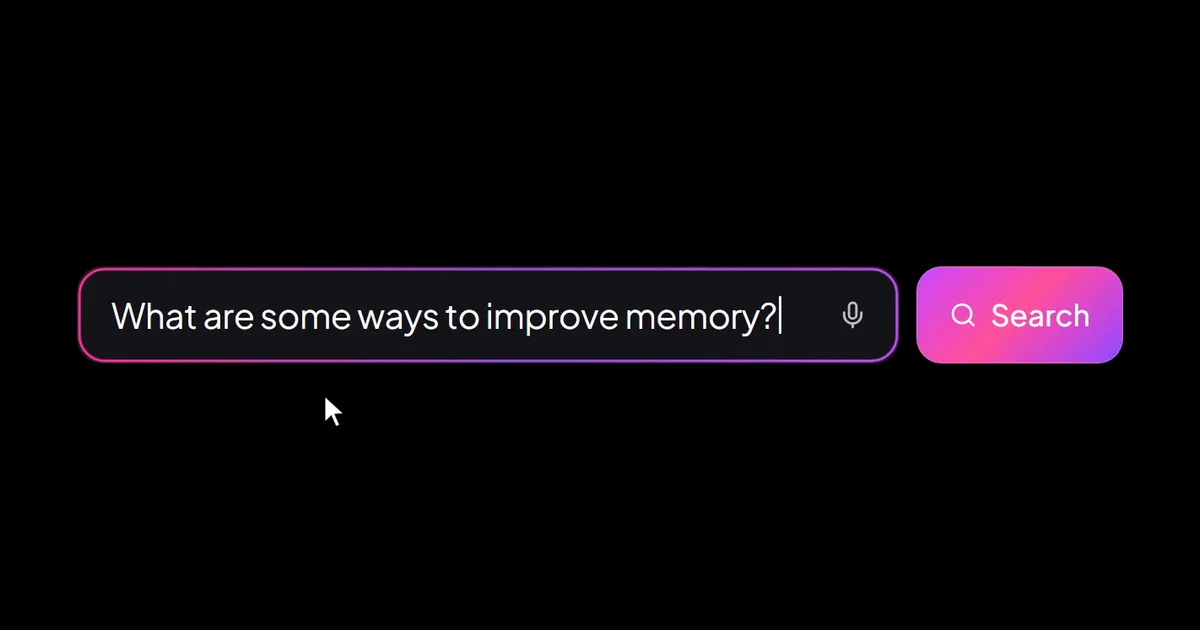
I used to animate search bar intros in Adobe After Effects one letter at a time. Getting the text to type at a natural speed, then moving a cursor onto the button, took most of an hour. You can now generate that same search bar with AI motion graphics tools. How to Create a Search Bar Animation with Easymotion With Easymotion, you can skip the timeline entirely. You do not have to keyframe the typing or the click. Here is exactly how to generate your search bar. Step 1: Open the Studio First, navigate to Easymotion in your web browser and click the "Start Creating" button. You will be prompted to log in or sign up for a free account. Once logged in, you will enter the main studio interface. Step 2: Enter Your Prompt You have two options to create your typing search bar animation. You can browse the template library to find a pre-made search bar style, or you can describe what you want in the prompt box. For example, type: "Create a search bar animation on a black background. Show a dark search bar with a pink glowing border, the placeholder Ask anything, a mic icon, and a pink Search button. Type What are some ways to improve memory? and click Search." A glowing pink search bar types What are some ways to improve memory? and clicks Search. Tip: To animate the search bar from your own website or app, click the paperclip, choose Add Design Reference, and attach a screenshot of it. Easymotion animates it. Step 3: Customize Using AI Chat Once your base animation generates, you can adjust the details using the AI chat panel located on the left side of the screen. Just type commands directly into the chat. For example, type: "Change it to a pill-shaped bar with a lime green glow, a lightbulb and a mic icon on the left, and a round green arrow button. Use the placeholder Find anything, then type Start a new project... and click the arrow." The system updates your video automatically. A pill-shaped search bar with a lime green glow types Start a new project... and clicks the arrow button. Step 4: Export Your Animation When you are happy with the result, click the Export button in the top right corner and select the MP4 format for a standard video file. To overlay this search bar onto another video, make the background transparent first: ask the chat for a transparent background, or press the checkerboard button on the background color in Quick Edit. When the preview shows a checkerboard, export in the MOV format and drop the file into Premiere Pro or DaVinci Resolve. Export your search bar animation in transparent MOV or standard MP4 format. Adobe After Effects vs AI Motion Graphics A typing search bar used to mean one keyframe per letter and a cursor timed by hand. Here is how that work compares to Easymotion in 2026. Aspect Adobe After Effects Easymotion Time to Create About 1 hour Under 60 seconds Skill Required Text animators and cursor keyframes No design skills needed Cost A Creative Cloud subscription Plans start at $10/month (free plan for template editing) Learning Curve Weeks of practice Instant text prompts Export Options A new render for every search One-click MP4 or transparent MOV Frequently Asked Questions How long does it take to create a search bar animation? Under 60 seconds. You type the search text and the style into the prompt box, and Easymotion adds the typing, the cursor, and the click. Do I need After Effects to make a typing search bar? No, you do not need Adobe After Effects or any design skills. You describe the search bar in a prompt, then change the text or the colors in the AI chat on the left. Can I change the style of the search bar? Yes. The second clip turns the pink bar into a pill with a lime green glow and new text in one chat message. You can also ask for a light theme or your brand colors. What format should I use to overlay the search bar on my video? Use a MOV file with a transparent background. Ask the chat for a transparent background, or set the background color to transparent in Quick Edit, until the preview shows a checkerboard. Then export MOV and place it over your footage in Premiere Pro or DaVinci Resolve. Use MP4 for a normal video file. Can I make a Google search animation instead? Yes. Ask for the Google homepage by name in the prompt. Easymotion builds the page, types your search, and clicks the button.
How to Create a Lower Third Animation with AI
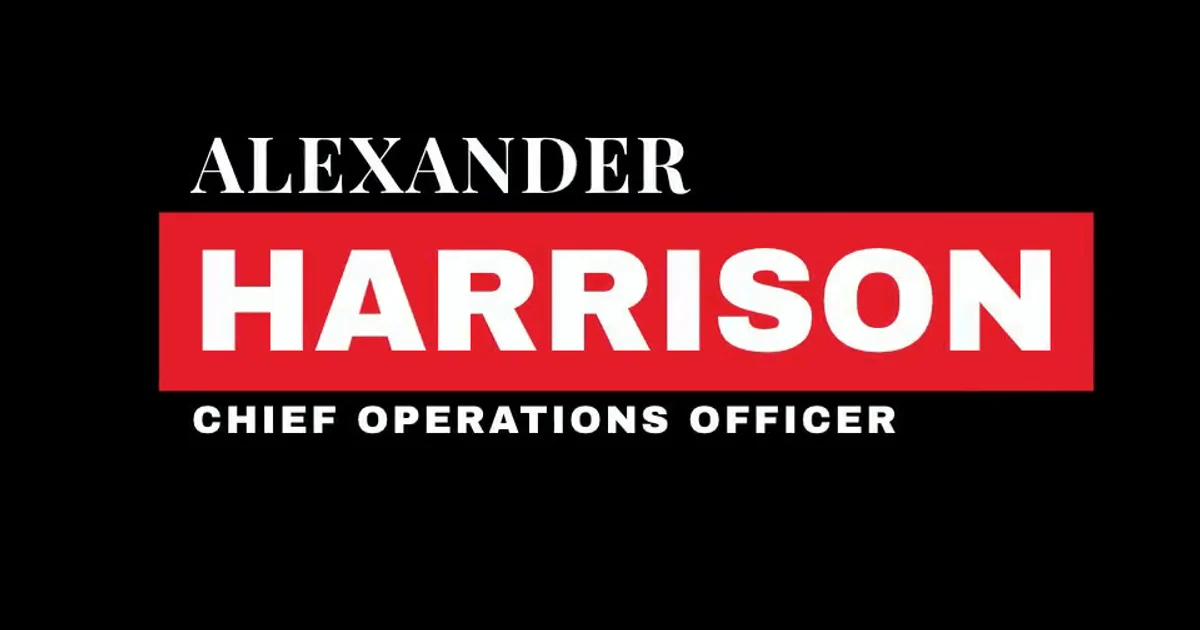
I used to spend an hour in Adobe After Effects on every set of interview lower thirds. Each name needed its own text layer, a shape that wiped in behind it, and a matching exit. You can now generate that same lower third with AI motion graphics tools. How to Create a Lower Third Animation with Easymotion With Easymotion, you can skip the timeline entirely. You do not have to animate the name bar or the wipe by hand. Here is exactly how to generate your lower third. Step 1: Open the Studio First, navigate to Easymotion in your web browser and click the "Start Creating" button. You will be prompted to log in or sign up for a free account. Once logged in, you will enter the main studio interface. Step 2: Enter Your Prompt You have two options to create your animated lower third. You can browse the template library to find a pre-made name lower third style, or you can describe what you want in the prompt box. For example, type: "Create a news lower third on a black background. Show ALEXANDER in a white serif font above HARRISON in bold white on a red bar, with the title CHIEF OPERATIONS OFFICER below. Wipe it in from a thin red line and wipe it out at the end." A news lower third for Alexander Harrison, Chief Operations Officer, on a red bar. Tip: Making lower thirds for a whole show? Save your colors, fonts, and logo in a Brand Kit once, and pick it before each prompt so every name matches. Step 3: Customize Using AI Chat Once your base animation generates, you can adjust the details using the AI chat panel located on the left side of the screen. Just type commands directly into the chat. For example, type: "Change the name to Isabella Rose Deluca and the title to Public Relations Manager. Put the title on a small pink tag at the top, then ISABELLA ROSE in pink and DELUCA in black, each on its own white block." The system updates your video automatically. A color block lower third for Isabella Rose Deluca, Public Relations Manager, in pink and white. Step 4: Export Your Animation When you are happy with the result, click the Export button in the top right corner and select the MP4 format for a standard video file. To overlay this lower third onto another video, make the background transparent first: ask the chat for a transparent background, or press the checkerboard button on the background color in Quick Edit. When the preview shows a checkerboard, export in the MOV format and drop the file into Premiere Pro or DaVinci Resolve. Export your lower third in transparent MOV or standard MP4 format. Adobe After Effects vs AI Motion Graphics A lower third used to mean a text layer, a shape layer, and a track matte for every name. Here is how that work compares to Easymotion in 2026. Aspect Adobe After Effects Easymotion Time to Create 30 to 60 minutes per name Under 60 seconds Skill Required Shape layers, track mattes, and easing No design skills needed Cost A Creative Cloud subscription Plans start at $10/month (free plan for template editing) Learning Curve Weeks of practice Instant text prompts Export Options A new render for every name One-click MP4 or transparent MOV Frequently Asked Questions How long does it take to create a lower third animation? Under 60 seconds. You type the name, the title, and the colors into the prompt box, and Easymotion builds the bar and the wipe in and out. Do I need After Effects to make an animated lower third? No, you do not need Adobe After Effects or any design skills. You describe the lower third in a prompt, then change the name or the colors in the AI chat on the left. Can I make a lower third for each person in my video? Yes. Make the first one, then type the next name and title into the AI chat. The style stays the same, and you export each name as its own file. What format should I use to put the lower third over my video? Use a MOV file with a transparent background. Ask the chat for a transparent background, or set the background color to transparent in Quick Edit, until the preview shows a checkerboard. Then export MOV and place it over your footage in Premiere Pro or DaVinci Resolve. Use MP4 for a normal video file. Where does the lower third sit on the screen? In the bottom left, where viewers expect a name. If your shot needs it somewhere else, ask the chat to move it to the bottom right or the center.
How to Create a Subscribe Button Animation with AI
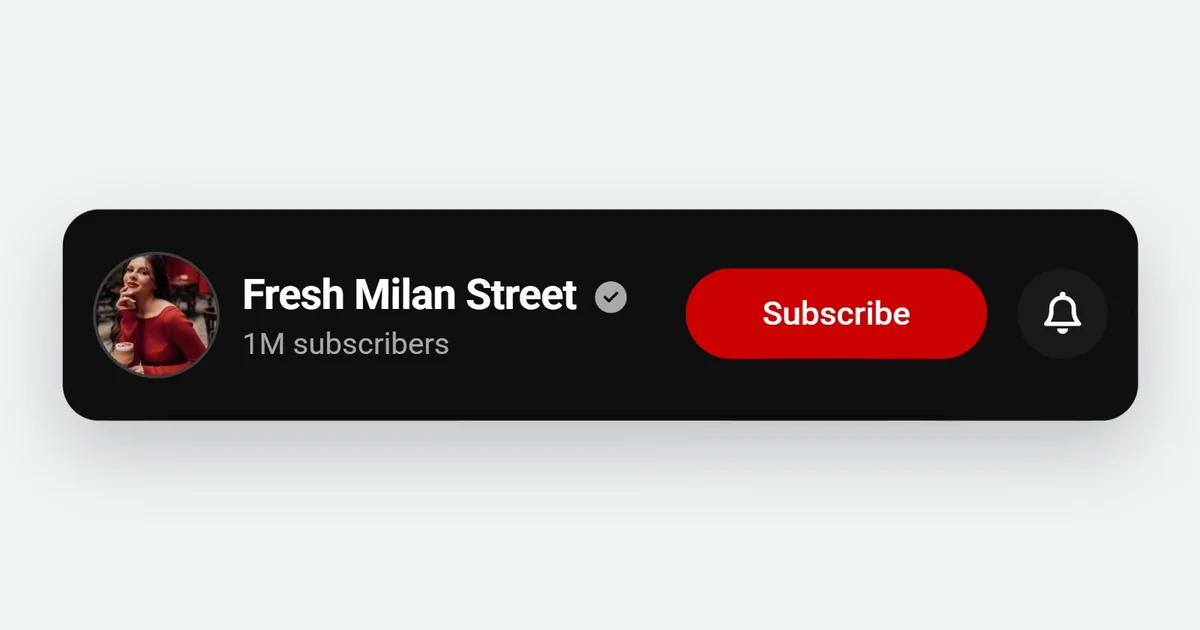
I used to spend over an hour in Adobe After Effects on a subscribe button that was on screen for a few seconds. The cursor had to land on the button, the red had to turn gray on the right frame, and the bell needed its own click. You can now generate that same subscribe button with AI motion graphics tools. How to Create a Subscribe Button Animation with Easymotion With Easymotion, you can skip the timeline entirely. You do not have to time the cursor, the click, and the bell by hand. Here is exactly how to generate your subscribe button. Step 1: Open the Studio First, navigate to Easymotion in your web browser and click the "Start Creating" button. You will be prompted to log in or sign up for a free account. Once logged in, you will enter the main studio interface. Step 2: Enter Your Prompt You have two options to create your YouTube subscribe button animation. You can browse the template library to find a pre-made subscribe button style, or you can describe what you want in the prompt box. For example, type: "Create a YouTube subscribe animation on a light gray background. Show a black channel bar for Fresh Milan Street with 1M subscribers and a red Subscribe button. A cursor clicks Subscribe so it turns gray and reads Subscribed, then clicks the bell." A black channel bar for Fresh Milan Street, where the cursor clicks Subscribe and then the bell. Tip: Making a button for YouTube Shorts? Pick 9:16 Vertical in the prompt box before you send, so the button is laid out for a vertical frame. Step 3: Customize Using AI Chat Once your base animation generates, you can adjust the details using the AI chat panel located on the left side of the screen. Just type commands directly into the chat. For example, type: "Turn it into an 8-bit pixel style on a bright blue background: a white Subscribe button with a black border, a bell icon, and a pixel font, with no channel name. Keep the click that changes it to Subscribed." The system updates your video automatically. An 8-bit pixel Subscribe button on a bright blue background that changes to Subscribed after the click. Step 4: Export Your Animation When you are happy with the result, click the Export button in the top right corner and select the MP4 format for a standard video file. To overlay this subscribe button onto another video, make the background transparent first: ask the chat for a transparent background, or press the checkerboard button on the background color in Quick Edit. When the preview shows a checkerboard, export in the MOV format and drop the file into Premiere Pro or DaVinci Resolve. Export your subscribe button animation in transparent MOV or standard MP4 format. Adobe After Effects vs AI Motion Graphics A subscribe button used to mean timing a cursor, a click, and a bell by hand. Here is how that work compares to Easymotion in 2026. Aspect Adobe After Effects Easymotion Time to Create About 1 hour Under 60 seconds Skill Required Cursor keyframes and shape layers No design skills needed Cost A Creative Cloud subscription Plans start at $10/month (free plan for template editing) Learning Curve Weeks of practice Instant text prompts Export Options A new render for every channel One-click MP4 or transparent MOV Frequently Asked Questions How long does it take to create a subscribe button animation? Under 60 seconds. You type the channel name and the subscriber count into the prompt box, and Easymotion adds the cursor, the click, and the bell. Do I need After Effects to make a YouTube subscribe animation? No, you do not need Adobe After Effects or any design skills. You describe the button in a prompt, then change the style or the text in the AI chat on the left. Can the button be in another language? Yes. Type the words you want in the prompt or the chat. The template library already has a German button that reads ABONNIEREN and changes to ABONNIERT after the click. What format should I use to overlay the subscribe button on my video? Use a MOV file with a transparent background. Ask the chat for a transparent background, or set the background color to transparent in Quick Edit, until the preview shows a checkerboard. Then export MOV and place it over your footage in Premiere Pro or DaVinci Resolve. Use MP4 for a normal video file. Does the subscribe button come with a click sound? No. The export is video only, with no sound. Add a click sound in your video editor, on the frame where the cursor presses the button.