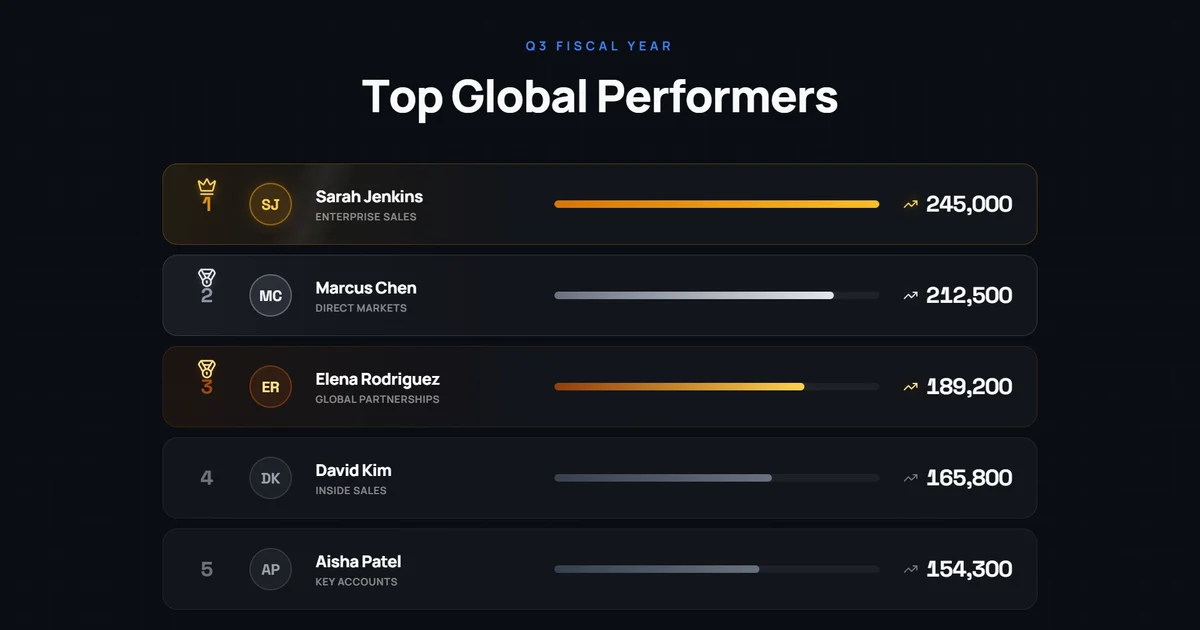
I used to spend an afternoon in Adobe After Effects on one animated leaderboard for a sales meeting. Every bar and every number needed its own keyframes, and one new score meant redoing the order. You can now generate that same leaderboard with AI motion graphics tools.
How to Create a Leaderboard Animation with Easymotion
With Easymotion, you can skip the timeline entirely. You do not have to keyframe each bar or count each score by hand. Here is exactly how to generate your leaderboard.
1Open the Studio
First, navigate to Easymotion in your web browser and click the "Start Creating" button. You will be prompted to log in or sign up for a free account. Once logged in, you will enter the main studio interface.
2Enter Your Prompt
You have two options to create your animated leaderboard. You can browse the template library to find a pre-made leaderboard style, or you can describe what you want in the prompt box. For example, type: "Create a dark leaderboard titled Top Global Performers, with the label Q3 Fiscal Year. Rank Sarah Jenkins 245,000, Marcus Chen 212,500, Elena Rodriguez 189,200, David Kim 165,800, and Aisha Patel 154,300. Grow a bar and count up each score, and give the top three gold, silver, and bronze trophies."
AI Motion Graphics Generator
Describe your motion graphics idea. Add a design reference if you'd like it to be recreated.
A dark leaderboard of the Top Global Performers, where Sarah Jenkins leads with 245,000.
Keep the scores in a spreadsheet? Click the paperclip, choose Add Data (CSV/XLSX), and attach it. Easymotion reads the names and scores and builds the leaderboard from them.
3Customize Using AI Chat
Once your base animation generates, you can adjust the details using the AI chat panel located on the left side of the screen. Just type commands directly into the chat. For example, type: "Make it a neon gaming leaderboard called CYBER LEAGUE, Season 04 Ranked, with CYB3R_PUNK 94200, N30N_N1NJ4 89150, GL1TCH_M4ST3R 85000, Z3R0_C00L 72000, and YOU. Start YOU in fifth place, then count YOU up to 105000 and move it to first." The system updates your video automatically.
A neon gaming leaderboard called CYBER LEAGUE, where YOU climbs from fifth to first with 105000 points.
4Export Your Animation
When you are happy with the result, click the Export button in the top right corner and select the MP4 format for a standard video file. To overlay this leaderboard onto another video, make the background transparent first: ask the chat for a transparent background, or press the checkerboard button on the background color in Quick Edit. When the preview shows a checkerboard, export in the MOV format and drop the file into Premiere Pro or DaVinci Resolve.
Copy-Paste Prompts for Your Animation
Paste one into the prompt box in Easymotion, then change the details to fit your video.
Prompt 1: Sales Leaderboard
Prompt 2: Light Sales Leaderboard
Prompt 3: Vertical Leaderboard
Adobe After Effects vs AI Motion Graphics
A leaderboard used to mean keyframing every bar and every number, then redoing the order when a score changed. Here is how that work compares to Easymotion in 2026.
| Aspect | Adobe After Effects | Easymotion |
|---|---|---|
| Time to Create | 2 to 3 hours | Under 60 seconds |
| Skill Required | Expressions for counting numbers and keyframed bars | No design skills needed |
| Cost | A Creative Cloud subscription | Plans start at $10/month (free plan for template editing) |
| Learning Curve | Weeks to months | Instant text prompts |
| Export Options | A new render for every score change | One-click MP4 or transparent MOV |